VRAM Basics — the budget everything lives inside
VRAM is the GPU's own memory, physically soldered next to the chip, connected by a firehose (that 1–3 TB/s bandwidth). System RAM is a separate pool connected through a straw: PCIe, at ~32–64 GB/s — roughly 30–50× slower than VRAM bandwidth. This gap is the iron law of GPU work:
Everything the model needs during inference must live in VRAM. Spilling to system RAM ("offloading") means feeding the GPU through the straw — the moment part of a model offloads, speed falls off a cliff. (Apple's unified memory dodges this by making it all one pool — the genuine architectural advantage behind the bandwidth compromise.)
So what actually fills the budget? Four items — and this equation is the sizing tool you'll use for every deployment decision from now on:
VRAM needed = model weights + KV cache + activations/overhead (+ headroom)
- Weights: the Lesson 2 math — params × bytes/param. 8B at Q4 ≈ 4.5 GB; at FP16 ≈ 16 GB.
- KV cache: the conversation's working memory — grows with context length and with each concurrent user. Full mechanism next topic; for now, know it can rival the weights themselves.
- Activations & framework overhead: the intermediate vectors flowing through layers plus the inference engine's bookkeeping — typically ~1–2 GB.
- Headroom: fragmentation is real; plan ~10% slack or meet the OOM crash at the worst moment.
Here's the budget drawn out for a concrete case — a 24 GB GPU running an 8B model at Q4 with a 32K context:
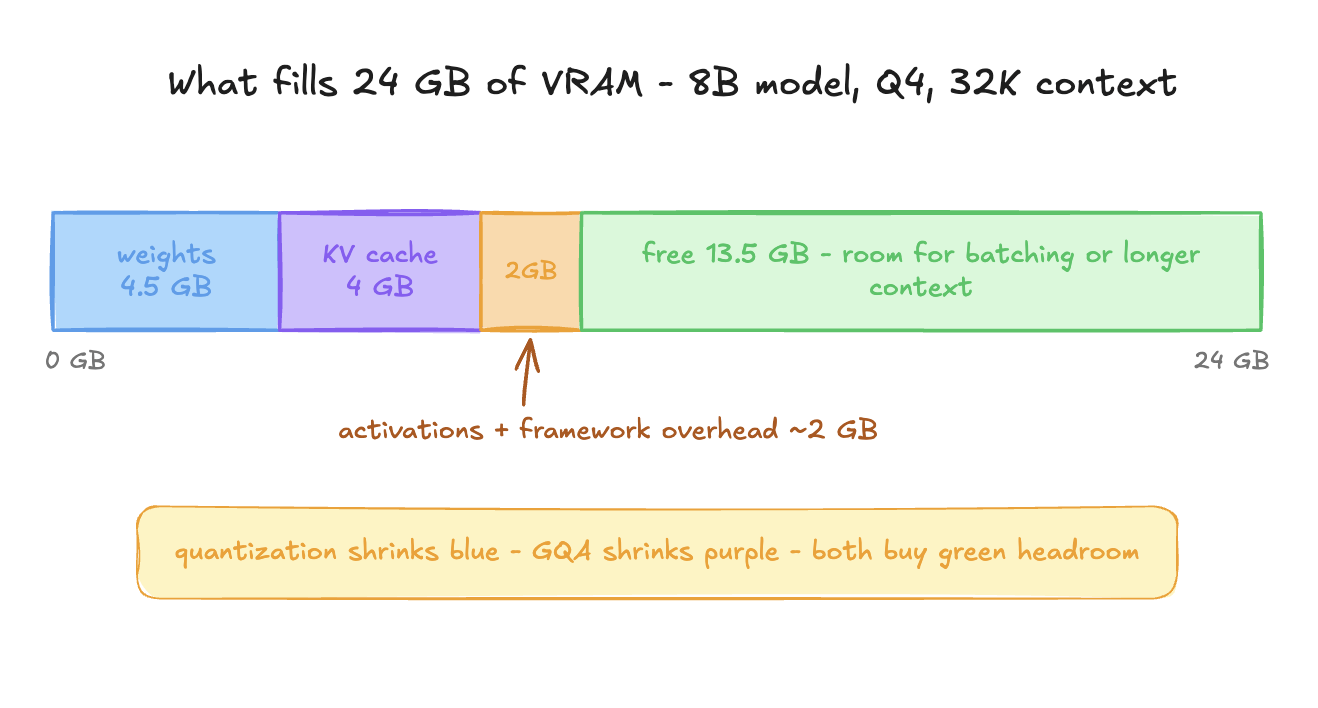
That green zone is the interesting part: it's not waste, it's capacity — room for more concurrent users (each needing their own KV cache) or longer contexts. Serving economics, next lesson, is largely the art of filling the green zone productively. And now Topic 29's rule of thumb — "GGUF file size ≈ RAM needed, plus a couple GB for context" — decompresses into its real form: file size is the blue segment; the "couple GB" was purple and orange all along.
Summary
VRAM is the fast local pool everything must fit inside; spilling over PCIe to system RAM is a 30–50× slowdown. Budget = weights + KV cache + ~2 GB overhead + headroom, and leftover space is serving capacity, not waste.
Mental model
The kitchen's pantry. Service runs only on what's inside; anything fetched from the warehouse across town (system RAM, through the PCIe straw) stalls the line. And pantry shelves you didn't fill with ingredients can hold more orders-in-progress.
Mistakes to avoid
- Budgeting only for weights — "8B at Q4 is 4.5 GB, my 8 GB card is fine!" — then hitting OOM the first time a conversation gets long. The purple segment grows; plan for it.
- Enabling CPU offload as a casual fix and accepting a silent 10–30× slowdown. Offloading is a last resort, not a setting.
Exercise
Redraw the budget bar (on paper) for your machine three times: (a) 8B at Q4 with 8K context, (b) 14B at Q4 with 8K, (c) 8B at Q4 with 128K. Use ~128 KB/token for the KV cache (justified next topic). Which configuration breaks your budget first — and is the culprit blue or purple? You've just learned that "can I run it?" has two answers depending on how long you talk to it.