Lesson 14The Five Places Models Live
Welcome to Module 9: Deployment — shorter than most and intensely practical. A model has to live somewhere, and there are exactly five addresses. Here they are on one line, from most convenient to most constrained:
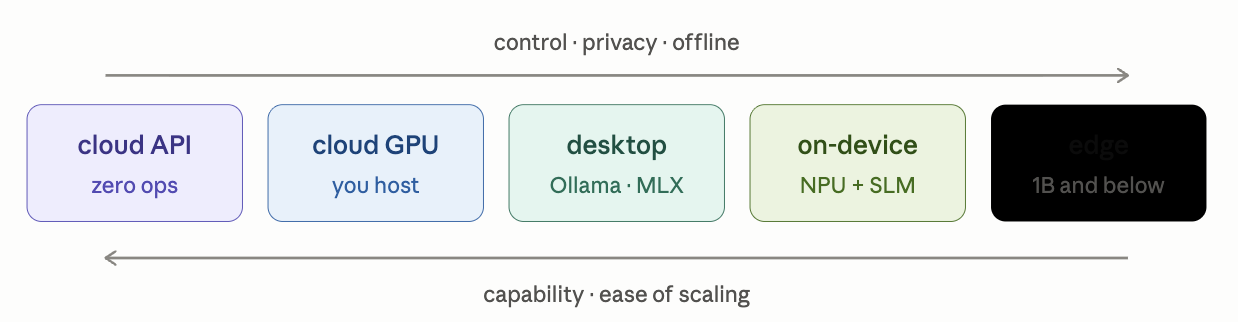
The two arrows are the whole module: every rightward step buys control, privacy, and offline operation by paying in capability and convenience. The first three stations you've visited (Topics 11, 37, 40); today we cover what's new at each and go all the way right.
Topic 68: Local Inference — from running models to shipping them
You run models locally every week now — Ollama, MLX, GGUF, the Topic 34 formula. So this topic addresses the version of "local" that's actually new: local inference as a product decision — putting a model inside software that other people install. Three problems appear the moment your users aren't you:
1. Distribution. Models are gigabytes; app stores and installers are not built for that. Three patterns: download-on-first-run (the standard — ship a small app, fetch the model with resumable downloads and a real progress UX; users forgive a one-time 4 GB download far more than a 4 GB installer), bundle a tiny model (sub-1B models are small enough to ship inside the binary for instant-on basics), or llamafile — the charming extreme: model + llama.cpp runtime fused into one executable that runs on every OS, no install at all.
2. Hardware heterogeneity. Your machine is one machine; your users have 8 GB fanless laptops and 24 GB gaming rigs. Shipping local AI means shipping a hardware-detection tier table: probe RAM/VRAM at first run, then select model size and quant accordingly — your Topic 25/31 cheat-sheet math, executed automatically per user. (Detect ≤8 GB → 3B-Q4; 16 GB → 8B-Q4; 24 GB+ → 14B; below minimum → cloud fallback.) And accept the honest cost: every user's hardware is now your test matrix — the support burden is the real price of local, more than any engineering.
3. Architecture. The clean pattern, built from pieces you own: the app talks to a localhost OpenAI-compatible endpoint (Topics 37/40's lingua franca — an embedded llama.cpp server or Ollama), which means the same application code serves local and cloud backends — and the hybrid becomes one config decision: local when hardware allows, cloud when it doesn't, user's choice surfaced as a privacy toggle.
When local-as-product wins: privacy-sensitive verticals (health, legal, anything where "your data never leaves your machine" is the headline feature), offline requirements, latency (zero network), and the economics nobody advertises — zero marginal inference cost: every token your users generate on their own silicon is a token you don't pay for, which at scale is a business model, not a feature. When it loses: the quality ceiling on weak hardware, the support matrix, and model-update logistics (shipping a new 4 GB model to 100K users is a real operation).
Summary
Shipping local AI = solving distribution (download-on-first-run/llamafile), heterogeneity (hardware-tiered model selection), and architecture (localhost OpenAI endpoint, cloud fallback) — bought with a support matrix, paid back in privacy, offline, and zero marginal cost.
Mental model
Selling appliances instead of running a restaurant. The restaurant (API) controls every plate but pays for every meal; the appliance cooks in the customer's kitchen for free forever — and now you have to make it work in every kitchen.
Mistakes to avoid
- Testing only on your own dev machine (an M4 is not your median user's laptop) and shipping a tier table with one tier. Test the floor, not the ceiling.
- Hardcoding one backend. The localhost-endpoint pattern costs nothing now and buys the local/cloud hybrid forever — skipping it is the one-way door.
Exercise
Write the tier table for a hypothetical local-AI note-taking app: four hardware tiers (8/16/24/32 GB), and for each — model + quant (justified with Topic 31 math), expected tok/s on typical bandwidth (Topic 34), and whether the tier meets a 20 tok/s streaming bar (Topic 38) or should default to cloud. One table, four rows: that's the actual planning artifact a local-AI product starts from.
Topic 69: On-Device AI — phones, NPUs, and the OS as router
"On-device" sounds like "local, smaller" — but phones are a genuinely different regime, ruled by three constraints desktops ignore: battery (every joule is user-visible), thermals (no fans — sustained generation throttles within a minute or two, so design for bursts, not streams), and shared memory (a "12 GB phone" offers your model maybe 2–4 GB after the OS and apps take theirs).
Those constraints explain the hardware answer: the NPU (Neural Processing Unit — Apple's Neural Engine, Qualcomm's Hexagon, Google's Tensor cores). What it actually is, in Topic 30's vocabulary: a fixed-function matrix engine optimized for low-precision math per watt. A GPU is a flexible army of line cooks that drinks power; an NPU is a stamped assembly die that does one thing — INT8/INT4 matrix multiplies — at a fraction of the energy. Marketing quotes NPUs in TOPS (trillions of int-8 ops/sec), but you know better than to stop there: Topic 34 still governs — LLM decode is bandwidth-bound, phone memory runs ~50–100 GB/s, so the arithmetic says 1–4B quantized models at usable speeds, and no TOPS figure changes that. The NPU's real gift is doing it without cooking the battery.
The software layer is where on-device got interesting recently. Both platforms now ship an OS-level model: Apple's Foundation Models framework exposes a ~3B on-device model any app can call with a few lines of Swift (structured output, tool calling included — directly relevant to your SwiftUI work); Android's AICore serves Gemini Nano similarly. And Apple's architecture is a delight to decode with course eyes: one shared base model + swappable LoRA adapters per feature — summarization adapter, rewrite adapter, notification-priority adapter — Topic 22's wardrobe pattern, running in your pocket, chosen precisely because adapters are megabytes while models are gigabytes. For custom models beyond the OS ones: Core ML, ExecuTorch, ONNX Runtime, and LiteRT are the deployment runtimes; llama.cpp compiles for phones too.
The strategic pattern to internalize is the hybrid escalator — Topic 38's router, elevated to operating-system policy: try on-device first (private, free, instant); escalate hard queries to the cloud, ideally with privacy machinery in between (Apple's Private Cloud Compute being the reference design). On-device handles the easy 80%; the cloud handles the hard 20%; the user experiences one assistant. Every routing lesson this course taught, now baked into platforms.
Summary
On-device = the battery/thermal/shared-RAM regime: NPUs deliver low-precision matmul per watt (bandwidth still caps decode), OS frameworks expose shared ~3B models with per-feature LoRA adapters, and the platform pattern is device-first with cloud escalation.
Mental model
A capable assistant living in your pocket on a strict energy allowance: answers quick questions instantly and privately, works in short bursts to avoid overheating, and phones the head office only for the questions genuinely above their pay grade.
Mistakes to avoid
- Comparing phone AI by TOPS. It's the FLOPS mistake of Topic 34 wearing a smaller jacket — bandwidth and memory decide LLM behavior on-device too.
- Designing sustained-generation UX for phones (live transcription + summarization streams, minutes of tokens). Thermal throttling will find you; burst-shaped features survive.
Exercise
Spec an on-device feature for your budget-tracker app: pick one burst-shaped AI feature (categorize a transaction from its description; monthly summary in one tap), decide OS model vs custom, estimate tokens per invocation, and write three sentences on what escalates to cloud and what the privacy story is. You've just written the planning doc for an Apple Foundation Models integration — a genuinely current skill.
Topic 70: API Serving — the production shell
You know the engine (vLLM, Topic 37/41) and the economics (Topic 36). What Module 4 didn't cover is the shell — everything between the user's request and any model, which every production service needs regardless of whose model answers. First, the three deployment shapes, so the vocabulary is fixed:
- Managed API — someone else's models, zero ops (Topic 11's rent-the-restaurant).
- Managed hosting / serverless GPU — your model (your Module 3 fine-tune) deployed on Modal/Replicate/HF-endpoints-style platforms: they run the GPUs, you get an endpoint, and scale-to-zero means idle costs nothing — with Topic 37's cold-start tax (tens of seconds loading weights) as the price of zero.
- Dedicated self-host — rented GPUs + vLLM, full control, batch economics fully yours.
Whichever shape serves the tokens, production traffic flows through the same shell:

Walking the shell, each piece earning its box:
- Gateway — and the rule it exists to enforce: API keys never touch the client. A browser or mobile app calling a model provider directly means your key ships inside it, gets extracted within days, and funds a stranger's startup. All traffic goes through your backend, which holds the keys, authenticates users, and enforces rate limits and per-user/per-feature budgets — because in LLM products, an abuse loop isn't spam, it's a five-figure invoice. Cost controls (
max_tokenscaps everywhere, spend alarms) are gateway logic, not afterthoughts. - Router — Topic 38's economics, deployed: classify difficulty, send the easy 80% to your fine-tuned 8B (marginal cost ≈ hardware ÷ Topic 36 batching), escalate the rest.
- Fallbacks — the ops truth nobody's architecture diagram admits until the first outage: providers go down and rate-limit you. Multi-provider failover with retries — same OpenAI-dialect interface everywhere (Topic 37's lingua franca making the swap trivial) — is the difference between "degraded" and "down." Tooling like LiteLLM packages gateway+router+fallback as one proxy; the concepts are exactly this diagram.
- Semantic cache — Topic 38's trick, installed at the shell: embed incoming queries, serve near-duplicates from cached answers before any model is consulted.
- Streaming passthrough — tokens must flow through your backend to the user (SSE end-to-end), because buffering the full response before forwarding destroys the TTFT experience Topic 38 declared sacred.
- Observability — log every hop: tokens in/out, latency, model chosen, cost, and for agent chains a trace linking the steps (Topic 60's debugging lesson, productionized). An LLM service without per-request cost metering is a service that discovers its unit economics from the monthly invoice.
Summary
Production serving = a shell around any model: gateway (keys server-side, auth, limits, budgets), router (cheap-first), multi-provider fallbacks, semantic cache, streaming passthrough, and cost-metered observability — identical whether the tokens come from your vLLM box or a frontier API.
Mental model
The front-of-house of a restaurant that outsources some dishes: the host checks reservations (auth), the maître d' routes orders to the cheap kitchen or the specialist (router), a backup caterer is on speed-dial (fallback), yesterday's popular dish is pre-plated (cache) — and every plate is costed on the way out.
Mistakes to avoid
- Shipping a client that calls the model provider directly "just for the MVP." The key will leak; the proxy pattern costs an afternoon and is never optional.
- No per-request cost logging. Products die of unnoticed token bleed — one chatty feature, one retry loop — that a single logged number would have caught in day one.
Exercise
Extend your Topic 38 serving spec with the shell: draw this diagram for your product, then specify — the rate limit per free user, the router rule (what marks a query "hard"?), the fallback chain in order, what the semantic cache keys on, and the five fields your per-request log line contains. That page plus Topic 38's page = a complete serving design doc.
Topic 71: Cloud GPUs — the rental market, decoded
Everything self-hosted or trained runs on rented silicon, and the rental market has a structure worth learning once. Two tiers of landlord:
- Hyperscalers (AWS/GCP/Azure): enterprise-grade, integrated with everything, and for GPUs specifically — expensive, quota-gated (you apply for H100 access), and famous for egress fees (moving data out costs real money). Right when your company already lives there.
- GPU neoclouds (CoreWeave, Lambda, RunPod, Vast.ai, Modal and kin): GPU-first providers, typically 2–5× cheaper, self-serve, minutes to a running instance. The practical default for individuals and startups — i.e., for you.
Three pricing modes: on-demand (pay hourly, keep it as long as you like), spot/interruptible (~⅓ the price, revocable anytime — and here Topic 26 pays its promised dividend: checkpoint discipline is literally what converts spot prices from a gamble into a 3× discount; save every N steps, resume on the next instance, pocket the difference), and reserved contracts (for sustained serving loads). Rough anchors — prices drift, verify current, but the ratios are durable: H100 ~$2–3/hr on-demand at neoclouds, A100 ~$1–1.5, 4090/A10-class ~$0.30–0.50, T4/L4 pocket change.
Picking the GPU is arithmetic you already own. The question is always "how much memory does the job need?" — and that's Modules 3–4: QLoRA-tune an 8B → 10 GB → any 24 GB card ($0.40/hr); QLoRA a 70B → 48–80 GB → A100/H100; serve N users → Topic 31's budget bar with Topic 32's per-user KV multiplier. Which enables the demystifying calculation this topic exists to deliver: your Lesson 6 capstone, run on rented iron — an 8B QLoRA over a few thousand examples is 1–3 GPU-hours on a 4090-class instance: one to two dollars. Fine-tuning costs less than lunch in Lahore. The mystique of "training AI models" dissolves into pocket money plus the data discipline of Module 2 — which was always the actual scarce resource.
The workflow that keeps it cheap: provision → bootstrap from a script or Docker image (instances are cattle, not pets — never hand-configure) → run with checkpoints writing to a persistent volume or object storage (instance disks die with the instance) → pull artifacts → terminate. And the number-one rookie leak, responsible for more wasted money than any pricing tier: the idle instance left running overnight. $2/hr × forgotten weekend = $96 of nothing. Auto-shutdown scripts and billing alarms are lesson zero. For bursty work — occasional fine-tunes, Topic 36's batch jobs — serverless GPU (pay-per-second, scale-to-zero) removes the leak entirely, trading Topic 37's cold starts for the impossibility of forgetting.
Summary
Rent from neoclouds; use spot + checkpoints for 3× savings; size the GPU with your own memory math; script the workflow with artifacts in persistent storage; terminate religiously or go serverless. A fine-tune costs lunch money — the data was always the expensive part.
Mental model
Renting workshop time, not buying the factory. Book the smallest bay your job fits (memory math), take the standby discount because your work survives interruption (checkpoints), keep your finished pieces off-site (object storage) — and never, ever leave the meter running on an empty bay.
Mistakes to avoid
- Renting an H100 for a job your arithmetic says fits in 24 GB. Compute the memory first (it takes ninety seconds); the 6× price difference is pure waste.
- Checkpointing to the instance's local disk, then terminating. The artifacts died with the machine. Persistent volume or bucket, from the first run.
Exercise
Actually do it — the course's cheapest rite of passage: rent a 24 GB spot/community instance (RunPod/Vast-class, ~$0.30–0.50/hr), run your Lesson 6 capstone or its Unsloth variant on it, save the adapter to persistent storage, download it, terminate, and screenshot the final bill. Target: under $2. The receipt is the lesson — you now know, not believe, what training costs.
Topic 72: Edge AI Basics — the far end of the spectrum
Past phones lies edge AI: inference on hardware at the data source — cameras, sensors, robots, kiosks, vehicles, factory controllers. The spectrum inside the spectrum: Jetson-class boxes (GPU-equipped, tens of watts) → Raspberry-Pi-class boards (CPU, a few watts) → microcontrollers (milliwatts, kilobytes — the TinyML world). Why anyone deploys here, when the cloud exists — five reasons, each decisive in its niche:
Latency (a robot's control loop or a vehicle's perception cannot wait for a network round-trip — physics, not preference), offline (farms, ships, factories with no reliable link), privacy/regulatory (footage that legally may not leave the premises), bandwidth economics (streaming 10,000 cameras to the cloud costs more than the cameras), and fleet economics (per-device inference is capex once; cloud inference is opex forever, multiplied by the fleet).
The constraints are Module 4's, turned to eleven: memory in MB-to-low-GB, power budgets measured in watts (sometimes solar), passive cooling, and hardware that must run untouched for years. The toolkit is your existing one, pushed to extremes, plus one new word: quantization to INT8/INT4 and below (Topic 24 at maximum pressure — edge NPUs often only speak low precision); distillation into the smallest viable student (Topic 17); compilation/operator-fusion runtimes (TensorRT, LiteRT, ONNX Runtime — Topic 34's fewer-trips-to-memory lesson, done by compilers); and the newcomer — pruning: deleting weights or entire neurons outright, leaving a sparse network. Honest note for your files: pruning shines in classic vision/audio models; for LLMs it has consistently underperformed quantization and remains a minor player — know the word, reach for the crayon box first.
The LLM-at-the-edge reality check, via your own formula: a Raspberry Pi 5 has ~17 GB/s of memory bandwidth; a 1B model at Q4 is ~0.6 GB; Topic 34 says ceiling ≈ 28 tok/s, reality under 10. So: 0.5–3B models run usably on Pi/Jetson-class hardware for narrow jobs — and microcontrollers are simply not LLM territory (their AI is keyword spotting, anomaly detection, gesture recognition: brilliant, tiny, non-generative). Which makes the dominant architecture a hierarchy, and it's Topic 38's router stretched across physical space: the edge does perception and filtering (the camera's tiny model detects "person at door"; the wake-word chip hears its name on milliwatts), and only the distilled, interesting fraction escalates to a bigger model on-device, on-prem, or in the cloud. Your smart speaker is the canonical stack: microwatt wake-word at the true edge, cloud LLM for the conversation — the whole spectrum of this lesson, collaborating in one product.
Summary
Edge = inference at the data source, chosen for latency, offline, privacy, bandwidth, and fleet economics, under brutal memory/power limits. Toolkit: extreme quantization, distillation, compiled runtimes, (pruning, minorly). LLMs reach Pi/Jetson-class at 0.5–3B; below that, classic TinyML — and real systems are hierarchies: edge perceives, cloud reasons.
Mental model
Border posts and headquarters. The posts (edge) watch everything with cheap, tireless, narrow attention and radio in only what matters; headquarters (cloud) does the deep thinking on the filtered signal. Nobody streams the whole border to HQ, and nobody puts a general in every watchtower.
Mistakes to avoid
- "Let's run the LLM on the device" as a starting point. Start from the filter: what tiny model at the edge would make 99% of cloud calls unnecessary? That's usually the product.
- Ignoring power and thermal budgets because the demo ran fine on a bench supply for ten minutes. Edge failures are duty-cycle failures — design for the watt budget, not the demo.
Exercise
Design the hierarchy for a real system — a shop's smart CCTV that answers "did anyone linger near the storeroom after closing?": specify what runs on-camera (model class, not LLM), what triggers escalation, what runs on the on-prem box vs cloud, and estimate the bandwidth saved vs streaming everything. Then compute, with Topic 34, whether a 3B-Q4 summarizer is viable on a Jetson with ~68 GB/s. One page — and you've architected across the entire spectrum this lesson drew.
Module 9: complete. Read the spectrum back one more time — cloud API, cloud GPU, desktop, pocket, edge — and notice you can now do the arithmetic at every station: what fits, how fast, what it costs, and what shell it needs around it. Deployment stopped being a mystery the day you learned params × bytes and bandwidth ÷ bytes; today just gave the answers addresses.
Next: Module 10 — Evaluation. The module the whole course has been foreshadowing every time I said "measure it, don't vibe it": AI benchmarks (what MMLU-class scores actually mean and how they rot — contamination, saturation, Goodhart), human evals (preference testing, A/B, the annotator-agreement problem you already met), LLM-as-judge done rigorously, building your own eval sets (the real skill), cost-per-token analysis, and speed/quality benchmarking as a discipline. It's the shortest path between "my model seems better" and "my model is better, here's the number" — and it's the skill that separates engineers from demo-builders.